Blogged by Ujihisa. Standard methods of programming and thoughts including Clojure, Vim, LLVM, Haskell, Ruby and Mathematics written by a Japanese programmer. github/ujihisa

Wednesday, December 30, 2009

Trying Out Bundler In 1 Minute

Let's write an application which uses the gem library "g" without installing it globally.

Mise En Place

Install bundler to make the application easily.

gem install bundler

And if you already have g, uninstall it to make sure the application you'll make doesn't use the globally installed g.

gem uninstall g

Getting Started

$ mkdir ggg; cd ggg
$ vim Gemfile
gem 'g'
gem 'ruby-growl'

$ gem bundle
$ vim app.rb
require 'vendor/gems/environment'
require 'g'
g 'success!!!'

$ ruby app.rb

That's all!

For your information:

$ tree
.
|-- Gemfile
|-- app.rb
|-- bin
|   `-- growl
`-- vendor
    `-- gems
        |-- cache
        |   |-- g-1.3.0.gem
        |   `-- ruby-growl-1.0.1.gem
        |-- doc
        |-- environment.rb
        |-- gems
        |   |-- g-1.3.0
        |   |   |-- README.markdown
        |   |   |-- Rakefile
        |   |   |-- VERSION
        |   |   |-- g.gemspec
        |   |   |-- lib
        |   |   |   `-- g.rb
        |   |   `-- spec
        |   |       `-- g_spec.rb
        |   `-- ruby-growl-1.0.1
        |       |-- LICENSE
        |       |-- Manifest.txt
        |       |-- Rakefile
        |       |-- bin
        |       |   `-- growl
        |       |-- lib
        |       |   `-- ruby-growl.rb
        |       `-- test
        |           `-- test_ruby-growl.rb
        `-- specifications
            |-- g-1.3.0.gemspec
            `-- ruby-growl-1.0.1.gemspec

14 directories, 20 files

Monday, December 28, 2009

Usually Something, But If...

Which do you prefer to write in Ruby?

if boundary_condition
  code_for_the_extreme_case
else
  code_for_the_typical_case
  ...
end

Or

unless boundary_condition # `if !boundary_condition` as well.
  code_for_the_typical_case
  ...
else
  code_for_the_extreme_case
end

In such cases, first I try to use guards. This is straightforward.

return code_for_the_extreme_case if boundary_condition
code_for_the_typical_case
...

But sometimes I cannot use such notation in cases where not to use return or break.

Solution

I made a DSL for this problem.

class UsuallyPending
  instance_methods.map {|i| i.to_s }.
    reject {|i| /__/ =~ i }.
    each {|m| undef_method m }

  def initialize(b1)
    @b1 = b1
  end

  def but_if(cond, &b2)
    if cond
      b2.call
    else
      @b1.call
    end
  end
end

def usually(&b1)
  UsuallyPending.new(b1)
end

usually do
  p ARGV
  p 'hello!'
end.but_if ARGV.empty? do
  p 'Give me arguments!'
end

This is a straightforward expansion of postpositive if with block instead of a value.

Sunday, December 27, 2009

BFC: Brainf\*\*k Compilers

Today I released BFC 1.0!

BFC: Brainf**k Compilers http://github.com/ujihisa/bfc

bfc.rb is a compiler written in Ruby, which can compile BF code to Ruby, C, Haskell, Scheme and LLVM.
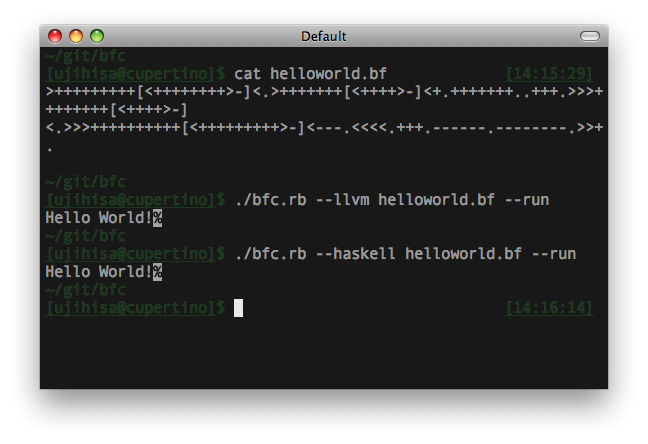
BFC Shot

USAGE OF BFC

$ ./bfc.rb --help
$ ./bfc.rb [-v|--version]

$ ./bfc.rb [-r|--ruby]    helloworld.bf > helloworld.rb
$ ./bfc.rb [-c|--c]       helloworld.bf > helloworld.c
$ ./bfc.rb [-h|--haskell] helloworld.bf > helloworld.hs
$ ./bfc.rb [-l|--llvm]    helloworld.bf > helloworld.ll
$ ./bfc.rb [-s|--scheme]  helloworld.bf > helloworld.scm

$ cat helloworld.bf | ./bfc.rb --ruby
$ ./bfc.rb [-r|--ruby|-c|--c|-h|--haskell|-l|--llvm] helloworld.bf --run
$ ./bfc.rb [-c|--c] helloworld.bf --without-while > helloworld.c
$ spec ./bfc.rb

THE BRAINF**K LANGUAGE

According to Wikipedia, the programming language Brainf**k has the following 8 tokens that each have semantics. Here is the equivalent transformation from Brainf**k to C.
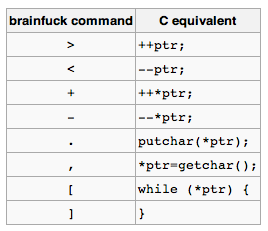
table

The bfc.rb converts BF codes to each languages mostly based on the table.

C Translation Table in bfc.rb:

',' => '*h=getchar();',
'.' => 'putchar(*h);',
'-' => '--*h;',
'+' => '++*h;',
'<' => '--h;',
'>' => '++h;',
'[' => 'while(*h){',
']' => '}'

Ruby Translation Table in bfc.rb:

',' => 'a[i]=STDIN.getc.ord',
'.' => 'STDOUT.putc(a[i])',
'-' => 'a[i]-=1',
'+' => 'a[i]+=1',
'<' => 'i-=1',
'>' => 'i+=1',
'[' => 'while a[i]!=0',
']' => 'end'

They are straightforward enough not to be explained the detail.

In the same way, we can write translation tables for most programming languages except special languages including Haskell and Assembly languages.

TRANSLATING TO HASKELL

Translating BF to Haskell needs two tricks. Haskell was difficult to handle BF because:

  • Variables in Haskell are not allowed to be re-assigned
    • ++h is impossible
  • There's no feature like while statement

So I used IO Monad with biding same-name variables, and defined while function.

Haskell Translation Table in bfc.rb:

',' => 'tmp <- getChar; h <- return $ update (\_ -> ord tmp) i h;',
'.' => 'putChar $ chr $ h !! i;',
'-' => 'h <- return $ update (subtract 1) i h;',
'+' => 'h <- return $ update (+ 1) i h;',
'<' => 'i <- return $ i - 1;',
'>' => 'i <- return $ i + 1;',
'[' => '(h, i) <- while (\(h, i) -> (h !! i) /= 0) (\(h, i) -> do {',
']' => 'return (h, i);}) (h, i);'

And the definition of while is:

while cond action x
 cond x    = action x >>= while cond action
 otherwise = return x

This is short, but can handle loop with changing the value with larger scope like C's.

TRANSLATING TO C WITHOUT WHILE STATEMENTS

Unlike the effort on Haskell, it is impossible to write simple translation table for C when I can use only goto for control flows instead of while statements. So I made the compile to have label counters to make labels for goto a lot.

Excerpt from bfc.c:

when ','; '*h=getchar();'
when '.'; 'putchar(*h);'
when '-'; '--*h;'
when '+'; '++*h;'
when '<'; '--h;'
when '>'; '++h;'
when '['; "do#{counter += 1}:"
when ']'
  "if (*h != 0) goto do#{counter}; else goto end#{counter};" <<
  "end#{counter}:"
end

TRANSLATING TO LLVM

LLVM Assembly language is similar to Haskell to the extent of the prohibition of re-assignments, and not similar to Haskell to the extend of having do syntax for Monad. So I decided to use pointers to store values. Also, LLVM needs many temporary variables which cannot be re-assigned, so I used counters again to use temporary constants.

The translation table with counters is too big to paste here, so I'll just show the definition of '+' which means '++h' in C.

when '+'
  a = tc += 1; b = tc += 1; c = tc += 1; d = tc += 1
  "%tmp#{a} = load i32* %i, align 4\n" <<
  "%tmp#{b} = getelementptr [1024 x i8]* %h, i32 0, i32 %tmp#{a}\n" <<
  "%tmp#{c} = load i8* %tmp#{b}, align 1\n" <<
  "%tmp#{d} = add i8 1, %tmp#{c}\n" <<
  "store i8 %tmp#{d}, i8* %tmp#{b}, align 1\n"

(where tc is the abbreviation of tmp counter.)

One more thing. LLVM is famous for its aggressive optimizations. For example, the result of the conversion from helloworld.bf to LLVM Assembly Language is very long.

$ ./bfc.rb --llvm ./helloworld.bf | wc -l
2842

But once you optimize the assembly by opt command of LLVM, the line of code will become shorter and more succinct.

SUMMARY

BFC supports compiling BF to the following language.

  • Ruby
  • C
  • Haskell
  • LLVM Assembly Language
  • Scheme

In some languages it was easy to write the translator, but Haskell and LLVM was tough for me.

If I have a plenty of time, I'd like to try these challenges:

  • Compiling to Erlang
  • Compiling to IA-32 Assembly Language
  • Compiling to LLVM Bitcode
  • More Spec!
  • Benchmark Suite

Anyway, I recommend you to take a look at the BFC. Enjoy!

Saturday, December 26, 2009

LLVM For Starters

Installation of LLVM Compiler and Runtime

See the previous post.

Overview of LLVM

To write a helloworld application, you can choose a path where to start. The typical path is,

  1. Write a code in LLVM Assembly Language (.ll)
    • $ vim sample.ll
  2. Compile it to LLVM Bytecode (.bc)
    • $ llvm-as sample.ll
  3. Run it on LLVM interpreter
    • $ lli sample.bc

Or,

  1. ditto
  2. ditto
  3. Compile it to Executable Binary File
    • $ llc sample.bc
  4. Run it!
    • $ ./sample

In this post, I'll explaing about the first step "LLVM Assembly Language".

Helloworld in LLVM Assembly Language

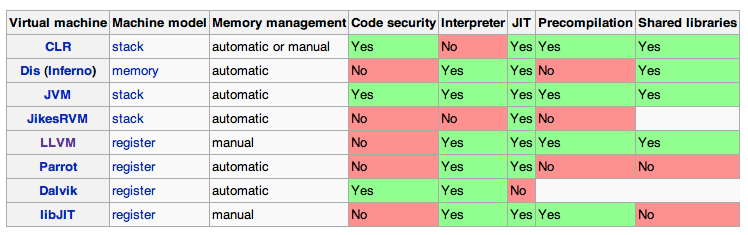
LLVM is not a stack machine but a register machine.

tableoftype

tableoftype

(This table is from wikipedia)

Let's write helloworld application. Before that, I'll show the equivalent code in C.

int main() {
  puts("Hello, world!");
  return 0;
}

In LLVM Assembly Language, the code will be written as below.

@str = internal constant [14 x i8] c"Hello, world!\00"
declare i32 @puts(i8*)
define i32 @main()
{
  call i32 @puts( i8* getelementptr ([14 x i8]* @str, i32 0,i32 0))
  ret i32 0
}

This code suggests the following notices:

  • We can write an integer number directly in the assembly code, on the other hand, we cannot write a string directly.
  • The long name getelementptr seems to be * in C.

If I write helloworld in C like the LLVM Assembly code, it is like:

char str[14] = "Hello, world!";
int main() {
  puts((char *)str);
  return 0;
}

Fibonacci in in LLVM Assembly Language

Nanki wrote Fibonacci in LLVM Assembly Language.

@str = internal constant [4 x i8] c"%d\0A\00"

define void @main() nounwind {
init:
  br label %loop
loop:
  %i = phi i32 [0, %init], [%i.next, %loop]
  %fib = call i32 @fib(i32 %i)

  call i32 (i8*, ...)* @printf( i8* getelementptr ([4 x i8]* @str, i32 0, i32 0), i32 %fib)

  %i.next = add i32 %i, 1

  %cond = icmp ult i32 %i.next, 30
  br i1 %cond, label %loop, label %exit

exit:
  ret void
}

define i32 @fib(i32 %n) nounwind {
  %cond = icmp ult i32 %n, 2
  br i1 %cond, label %c1, label %c2

c1:
  ret i32 1
c2:
  %n1 = sub i32 %n, 1
  %n2 = sub i32 %n, 2

  %fib1 = call i32 @fib(i32 %n1)
  %fib2 = call i32 @fib(i32 %n2)

  %r = add i32 %fib1, %fib2
  ret i32 %r
}

declare i32 (i8*, ...)* @printf(i8*, ...) nounwind

To understand the code deeper, let me write back the code in C.

#include<stdio.h>
int fibonacci(int n);

int main() {
  int i, i_next, fib;
init:
  i = 0, i_next = 0;
loop:
  i = i_next;
  fib = fibonacci(i);
  printf("%d\n", fib);
  i_next = i + 1;
  if (i_next < 30) {
    goto loop;
  } else {
    goto exit;
  }
exit:
  return 0;
}

int fibonacci(int n) {
  int cond, n1, n2, fib1, fib2, r;
  cond = n < 2;
  if (cond) {
    goto c1;
  } else {
    goto c2;
  }
c1:
  return 1;
c2:
  n1 = n - 1;
  n2 = n - 2;
  fib1 = fibonacci(n1);
  fib2 = fibonacci(n2);
  r = fib1 + fib2;
  return r;
}
  • LLVM Assembly Language enables us to use the same name both for a variable and a function because of the existence of prefix
  • LLVM Assembly Language cannot handle many calculation at the same time like return fib(n-2) + fib(n-1).

Tuesday, December 22, 2009

Let's Try LLVM

Mac OS X has LLVM compiler, but doesn't have LLVM Assembler. Let's start installing the trunk LLVM on your Mac.

According to http://llvm.org/docs/GettingStarted.html#checkout,

$ cd ~/src
$ svn co http://llvm.org/svn/llvm-project/llvm/trunk llvm
$ cd llvm

In the directory there is /docs directory which contains many html files. Check them.

$ ./configure --prefix=/Users/ujihisa/src/llvm/usr
$ gmake -k |& tee gnumake.out

It took long time. After the build process, I found an interesting note.

...
gmake[1]: Leaving directory `/Users/ujihisa/src/llvm/bindings'
llvm[0]: ***** Completed Debug Build
llvm[0]: ***** Note: Debug build can be 10 times slower than an
llvm[0]: ***** optimized build. Use make ENABLE_OPTIMIZED=1 to
llvm[0]: ***** make an optimized build. Alternatively you can
llvm[0]: ***** configure with --enable-optimized.

I should have set --enable-optimized.

Anyway, let the installation finish.

$ gmake install

It also took time.

Don't forget to make path to the ./usr/bin/. There are many llvm-related executable files.

Hello, world!

Let's write hello world on LLVM!

I referred this page. The sample code contains a small mistakes, so I fixed.

Write the following code on a.ll (not a.11):

@str = internal constant [13 x i8] c"hello world\0A\00"

define void @main() nounwind
{
  %temp = call i32 @printf( i8* getelementptr ([13 x i8]* @str, i32 0,i32 0))
  ret void;
}

declare i32 @printf(i8*, ...) nounwind

Assemble it:

$ llvm-as -f a.ll
$ lli a.bc
hello world

Yay!

The generated file a.bc is a binary file.

Vim

Fortunately the svn repository contains a vim script for llvm named llvm.vim. You should install it if you're a vimmer.

(To be continued...)

Monday, December 21, 2009

Today's RubySpec (Dec 21, 2009)

I succeeded in fixing RubySpec to pass all String specs both in Ruby 1.8.7 and Ruby 1.9.2. yay!

$ /usr/bin/ruby ../mspec/bin/mspec ./core/string/*.rb -t ~/rubies/bin/ruby192
ruby 1.9.2dev (2009-12-21 trunk 26145) [i386-darwin9.8.0]
.............................................................................................

Finished in 0.559929 seconds

93 files, 1083 examples, 6132 expectations, 0 failures, 0 errors
$ /usr/bin/ruby ../mspec/bin/mspec ./core/string/*.rb -t ~/rubies/bin/ruby187
ruby 1.8.7 (2009-07-30 patchlevel 192) [i686-darwin9.7.0]
.............................................................................................

Finished in 0.483685 seconds

93 files, 889 examples, 5620 expectations, 0 failures, 0 errors

New knowledges for me

  • String#squeeze, #count and #delete receive string sequence like "a-c". In Ruby 1.8, an invalid sequence like "c-a" is just regarded as empty sequence. On the other hand, in Ruby 1.9, it raises an ArgumentError.
  • "\u0085" is NEL: Next Line in utf-8. On my Terminal, it looks like "\n". But actually "n" and NEL are completely different characters.
  • String#% Differs Between Ruby 1.8 and 1.9 (the previous blog post)

`String#%` Differs Between Ruby 1.8 and 1.9

Try the following code on your ruby.

p('%-03d' % -5)

The result on ruby 1.8.* is "-05" while the result on ruby 1.9.* is "-5 ".

So, which behavior is correct? The answer is the latter.

  • String#% is subject to be equivalent to sprintf(3)
  • "-" means "left-align"
  • "0" means "completing the spaces with 0" when the alignment is right-align

So, "-0" is equivalent to mere "-". According to the principle, the behavior on ruby 1.8 is wrong.

(I think that the reason why ruby core developers don't change the 1.8's behavior is that the change may break existing codes.)

Followers