Blogged by Ujihisa. Standard methods of programming and thoughts including Clojure, Vim, LLVM, Haskell, Ruby and Mathematics written by a Japanese programmer. github/ujihisa

Tuesday, September 7, 2010

RSpec for Java

I think the reasons why people are using Java are in the following list.

  • The product must run on JVM
  • You are fixing existing code that is written in Java
  • You or your co-workers love Java

Java has some testing frameworks written in Java, but it's difficult to implement something like RSpec due to the limitation of Java syntax. But actually you don't have to use a testing framework in Java but can use RSpec on JRuby, even though the product is not using JRuby.

A minimum example

Hello.java

public class Hello {
  public String world() {
    return "world!";
  }
}

hello_spec.rb

require 'java'
java_import 'Hello'

describe 'Hello' do
  it 'world' do
    Hello.new.world.should == 'world!'
  end
end

Compile Hello.java and run RSpec command.

$ javac Hello.java
$ jruby -S spec hello_spec.rb

This works.

If you didn't install RSpec yet, you can install it with the following command.

$ jruby -S gem install rspec

A bit complex example

This approach is powerful; you can use a Java bytecode which was compiled with some special parameters like -target. For example, J2ME programs needs to be compiled as Java 1.4 and needs a jar file as well. You still can spec such program.

A.java

import javax.microedition.midlet.MIDlet;

class A extends MIDlet {
  public void destroyApp(boolean unconditional) {
    notifyDestroyed();
  }
  protected void pauseApp() {
  }
  protected void startApp() {
  }
  static public String f() {
    return "sajdfksadfsd";
  }
}

a_spec.rb

require 'java'
java_import 'A'

describe 'A.f' do
  it 'is on java' do
    RUBY_DESCRIPTION.should be_include 'jruby'
  end

  it 'is a strange string' do
    A.f.should == 'sajdfksadfsd'
  end
end

run

$ javac -target 1.4 -source 1.4 -g:none -bootclasspath the-jar-file.jar A.java
$ jruby -J-cp the-jar-file.jar:. -S ~/git/jruby/bin/spec a_spec.rb

It works.

Sunday, September 5, 2010

Shows Message Immediately in Haskell

You've seen such a prompt very often.

OK? [y/n]

Your cursor is just after the prompt with 1 space. If you type y the process will continue and if you type any other characters, not only n, the process will stop. This is easy to implement in Ruby.

print "OK? [y/n] "
if gets.chars.first == 'y'
  puts 'go go go'
else
  puts 'nooo'
end

It seems to be easy for Haskell beginners to implement it in Haskell like the following code.

main = do putStr "OK? [y/n] "
          s <- getLine
          case (head s) of
               'y' -> putStrLn "Nice"
               otherwise -> putStrLn "omg"

But it doesn't work appropriately due to stdout buffering. Haskell has IO library that can control buffering. Add hFlush stdout after importing the library.

import IO (hFlush, stdout)

main = do putStr "OK? [y/n] "
          hFlush stdout
          s <- getLine
          case (head s) of
               'y' -> putStrLn "Nice"
               otherwise -> putStrLn "omg"

This works.

Monday, August 16, 2010

Regular Expression Benchmarks

Most modern programming languages have regular expression engines. Here I'll compare the speed of each regular expression engines with long text matching which has backtracking. I used Ruby, Perl and Python for this examination.

A time-consuming regular expression example

/(aa)*aa/ =~ 'aa' needs backtracking. The longer the length is, the longer it would take. Let m as the length of the characters and n as the number of repeat. For example the case when n = 2 and m = 3 is

/(aa)*aa(bb)*bb(cc)*cc/ =~ 'aabbcc'

Codes

Ruby:

def time
  t = Time.now
  yield
  Time.now - t
end

def ryutorion(m, n)
  chars = (0...n).map {|i| ('a'.ord + i % 26).chr }
  regex = Regexp.new chars.map {|c| "(#{c*m})*#{c*m}" }.join
  str = chars.map {|c| c*m }.join
  time { regex =~ str }
end

Python:

import re
import time

def timeof(f):
    t = time.time()
    f()
    return time.time() - t

def ryutorion(m, n):
    chars = [ chr(ord('a') + i % 26) for i in range(n) ]
    regex = re.compile(''.join([ '(' + c*m + ')*' + c*m for c in chars ]))
    str = ''.join([ c*m for c in chars ])
    return timeof(lambda: regex.match(str))

Perl:

use warnings;
use strict;
use Time::HiRes qw(gettimeofday tv_interval);

sub gen_regex {
    my ($m, $n) = @_;

    join "", map { 
        my $s = chr(ord('a') + ($_ % 26)) x $m;
        "($s)*$s"
    } (0 .. $n - 1);
}

sub gen_input {
    my ($m, $n) = @_;

    join "", map { chr(ord('a') + ($_ % 26)) x $m } (0 .. $n - 1);
}

my $r = gen_regex 1, 1;
my $i = gen_input 1, 1;
$r = qr/$r/;
my $ts = [gettimeofday];
my $te = [gettimeofday] if($i =~ /$r/);
my $elapsed = tv_interval $ts, $te;
print "$elapsed\n";

for my $N (10, 20) {
    for my $M (10000, 20000) {
        $r = gen_regex $M, $N;
        $i = gen_input $M, $N;
        $r = qr/$r/;
        $ts = [gettimeofday];
        $te = [gettimeofday] if($i =~ /$r/);
        $elapsed = tv_interval $ts, $te;
        print "$elapsed\n";
    }
}

This perl example was written by Masahiro Kimoto.

Result

shorter test: n = {10000, 20000} = m = {10, 20}

  • Ruby

    p ryutorion(10000, 10) #=> 0.000278
    p ryutorion(20000, 10) #=> 0.000698
    p ryutorion(10000, 20) #=> 0.000538
    p ryutorion(20000, 20) #=> 0.001026
    
  • Python

    print ryutorion(10000, 10) #=> 0.00126099586487
    print ryutorion(20000, 10) #=> 0.00168895721436
    print ryutorion(10000, 20) #=> 0.00180792808533
    print ryutorion(20000, 20) #=> 0.00338697433472
    
  • Perl

    ($M = 10000, $N = 10) #=> 0.000066
    ($M = 20000, $N = 10) #=> 0.000185
    ($M = 10000, $N = 20) #=> 0.000163
    ($M = 20000, $N = 20) #=> 0.000294
    

longer test: n = {10000, 20000} = m = {100, 200}

  • Ruby (ruby 1.9.2)

    0.002721
    0.00672
    0.005441
    0.013364
    
  • Python (python 2.7)

    Traceback (most recent call last):
      File "a.py", line 16, in <module>
        print ryutorion(10000, 100)
      File "a.py", line 11, in ryutorion
        regex = re.compile(''.join([ '(' + c*m + ')*' + c*m for c in chars ]))
      File "/usr/local/Cellar/python/2.7/lib/python2.7/re.py", line 190, in compile
        return _compile(pattern, flags)
      File "/usr/local/Cellar/python/2.7/lib/python2.7/re.py", line 243, in _compile
        p = sre_compile.compile(pattern, flags)
      File "/usr/local/Cellar/python/2.7/lib/python2.7/sre_compile.py", line 511, in compile
        "sorry, but this version only supports 100 named groups"
    AssertionError: sorry, but this version only supports 100 named groups
    
  • Perl (perl 5.10.0)

    0.000981
    0.00269
    0.004181
    0.005484
    

Summary

Perl is the strongest. Use Perl.

Sunday, August 15, 2010

Haskell liftM practice

with lists

I was trying to remember how to use Haskell. This blog post focuses only on Control.Monad.liftM function.

The type of liftM is (Monad m) => (a1 -> r) -> m a1 -> m r which evaluates the second argument with the first argument as if it's in do block.

Let me explain that with the following example. You need the list of the values which each of them are three times bigger than the original list [1, 2, 3]. The most straightforward way in Haskell is to use list comprehension.

[ x * 3 | x <- [1, 2, 3]]

List Comprehension is just a syntactic sugar of List Monad. The code is equivalent to the following code.

do x <- [1, 2, 3]
   return $ x * 3

Do notation is just a syntactic sugar of List Monad as well.

[1, 2, 3] >>= \x -> return (x * 3)

You also can make the code simpler with point free style.

[1, 2, 3] >>= return . (* 3)

Now it's time to use liftM. You can write the code with liftM in the following way.

liftM (* 3) [1, 2, 3]

This is the simplest. Note that you have to declare import Control.Monad to use liftM.

with Parsec

The code below is from Write Yourself a Scheme in 48 Hours.

parseNumber = liftM (Number . read) $ many1 digit

I rewrite it without liftM.

parseNumber = do x <- many1 digit
                 return $ Number $ read x

or

parseNumber = do x <- many1 digit
                 return $ (Number . read) x

or

parseNumber = many1 digit >>= \x -> return $ (Number . read) x

or

parseNumber = many1 digit >>= \x -> (return . Number . read) x

or

parseNumber = many1 digit >>= return $ Number . read

summary

Using liftM can make code simpler and easier to understand with its natural order of arguments.

The most difficult thing for using liftM is to write the correct spelling of liftM. I cannot remember how many times I wrote listM instead of liftM. It is very difficult and fatal issue.

Thursday, July 15, 2010

Combining Java, Clojure and JRuby

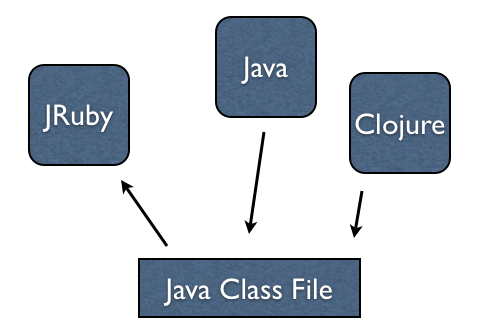
JRuby can access classes implemented in pure Java code. Clojure can generate a class file. Therefore it's straightforward for JRuby to access classes implemented in Clojure.

relationship

First I define a class with a method in plain Java.

MrJava.java: